
Hostinger Web Hosting Review (2026)
Looking for the best WordPress hosting options? It’s hard to avoid Hostinger. WordPress support with low initial pricing is coupled with what the website says will include: free CDN, SSL, free backups, email, some AI tools, and a user-friendly dashboard that would not scare any novice. But the really cheap stuff is only a good bargain if the hosting can keep up when you load a real website on it.
And that is exactly what this Hostinger review 2026 covers – speed, uptime, features, pricing, renewal rates, WordPress performance, and what you get for your money as someone launching a new website.
How this review was tested:
Rather than leaning solely on one speed test to justify any sort of performance claim, I pulled together independent testing data from multiple sources. I looked up all current pricing and plans and correlated that information with Hostinger’s ongoing website performance data from HostingStep’s ongoing 365-day WordPress Benchmark test, AdwaitX’s hosting tests over several months, and also the 2026 WordPress tests from Fix My Page Speed. You’ll find this is why testing results can vary – the testers used different testing servers, locations, WordPress setups, caching setups, PS, and monitoring methods. This is really important, because a provider’ll report very fast TTFB performance in one setting but show much slower TTFB performance in other situations.
But whether Hostinger is still a valid option for beginners deserves a real question mark.
Yes — but mainly because of its price-to-performance balance, not because it is the fastest host available.
Hostinger Review: Pros and Cons
Pros
⦁ Competitive introductory pricing
⦁ Strong uptime in independent long-term testing
⦁ LiteSpeed-based hosting
⦁ CDN included on current plans
⦁ Free SSL
⦁ Free domain for one year on eligible plans
⦁ WordPress support and migration tools
⦁ Beginner-friendly hPanel
⦁ 30-day money-back guarantee
⦁ Good selection of AI and website-building tools
⦁ Higher plans offer significantly more resources
Cons
⦁ Renewal prices are substantially higher than introductory prices
⦁ Cheapest plans have fewer resources
⦁ Performance depends heavily on caching and website configuration
⦁ Shared hosting is not ideal for resource-intensive websites
⦁ Support is primarily online rather than traditional phone support
⦁ Some features are limited to the first year
That last point deserves attention. The promotional price gets the click, but the renewal price determines whether Hostinger remains a good long-term deal.
Hostinger Speed Test Results: How Fast Is It?
If there’s one reason why the search for a “Hostinger web hosting review 2026” is a very common one, it’s speed. Because no one wants to start an amazing website, only to watch it crawl at snail’s pace from an inexpensive host.
And on this front, Hostinger gets good scores according to independent 365-day testing conducted by HostingStep.
In fact, of all Shared hosting plans tested from November 2024 – November 2025, only one other provider recorded a lower uptime than the Hostinger Premium plan, which measured 99.9937%uptime (a total of just 33 minutes downtime in 2025).
TTFB(time to first byte):
The overall response time for the test from 19 globally distributed locations with HostingStep measured an impressive average of 404ms TTFB. However, keep in mind that their test of Hostinger Premium didn’t benefit from the same CDN acceleration as some of the Business-focused providers, including other plans on Hostinger. Hostinger’s own performance is influenced heavily by the plan selected, server locations, caching, CDN delivery and even your site’s optimisation in terms of theme selection, database structure, content and many other factors – so take reported values with a pinch of salt.
Hostinger speed test vs 0.3-second benchmark:
Don’t be fooled by sites reporting a sub-300ms response rate for Hostinger.
As HostingStep points out, the reported average TTFB for their test is based on continuous long-term evaluation across 19 international servers, far more comprehensive than a quick 30-minute test from just a single server. AdwaitX tested for a full 365-day period as well from the USA (not worldwide) but using several different plans, resulting in a Combined result of 902 ms TTFB & Page Load Speed of 2.462 seconds, illustrating how the test strategy can significantly impact the outcome.
Hostinger WordPress Performance
WordPress users have slightly different requirements from someone running a simple static website.
A WordPress site generates database queries, loads PHP, executes plugins, processes themes, and often serves large images. A poor host can make all of that move slowly.
Fix My Page Speed: the tools they utilize in the comparison are GTmetrix, Pingdom, and Google Page Speed Insights on a standard, untouched WordPress installation. Under the test from the host, it demonstrated a loading speed average of 1.2sec.
That is a good result for budget hosting.
However, you should not expect your own website to automatically load in 1.2 seconds.
A site with:
⦁ Elementor
⦁ 20+ plugins
⦁ oversized images
⦁ several tracking scripts
⦁ advertising networks
⦁ unoptimized CSS
⦁ external fonts
⦁ poorly configured caching
can be much slower.
In other words, Hostinger can provide a good foundation, but hosting cannot compensate for a badly optimized WordPress installation.
Hostinger LiteSpeed matters
Hostinger includes LiteSpeed in its hosting. You can also install LiteSpeed caching on your website since you have WordPress.
The 2 of them will help to minimise the time taken for your server to process and enhance the performance of serving cached pages.
This is good for those first-time WordPress website owners as they Don’t have to go through a complicated caching setup process… however, if you do set your caching properly,y as having more plugins means it will be slower.
Hostinger Uptime: Is It Reliable?
That was one of the better showings for Hostinger among our best shared-hosting platforms. Indeed, what use is a 500ms page load when nobody’s getting to it? This figure came in at an average of 99.9937% for Hostinger during our 2025 period, equating to 33.63 minutes of downtime on average in the entire year.
This was among Hostinger’s best shared-hosting performances in the benchmark.
Hostinger claims an impressive 99.9% uptime guarantee on their hosting plans themselves. This is why I wanted to distinguish between the guarantee and the independent tests: a guarantee is a contract, whereas independent monitoring actually tells you what was happening. For your normal portfolio site, blog, or affiliate site-even for a small business site-Hostinger’s history is reassuring. As you may anticipate, though, I’d suggest managed or resource-intensive cloud hosting for business-critical e-commerce functionality.
Hostinger Pricing in 2026
Pricing is where Hostinger becomes particularly interesting.
The company frequently changes promotional offers, so you should check the official pricing page immediately before purchasing.
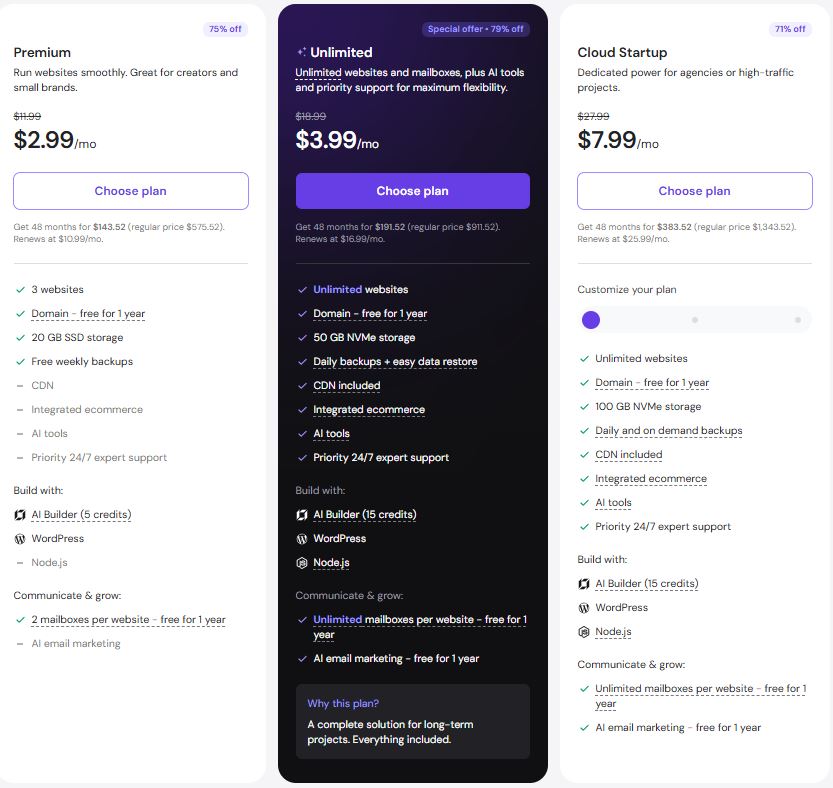
Unlimited features are subject to our Fair Usage Policy.
All plans are paid upfront. The monthly rate reflects the total plan price divided by the number of months in your plan.
Which Hostinger Plan Is Best for Beginners?
For most beginners, I would start with Premium.
The current plan supports up to three websites, includes 20GB SSD storage, a free domain for one year, weekly backups, CDN, WordPress support, and priority support.
That is enough for a new blog, portfolio, small business website, or early-stage affiliate site.
You do not need Cloud hosting simply because it sounds more powerful.
Choose Premium if:
⦁ You are launching your first website
⦁ You have one to three small sites
⦁ Your traffic is still low
⦁ You want to keep initial costs down
⦁ You mainly publish articles or basic business pages
Choose Unlimited if:
⦁ You need more than three websites
⦁ You want 50GB of NVMe storage
⦁ You want daily backups
⦁ You need more room for several projects
⦁ You want unlimited websites under one account
Choose Cloud Startup if:
⦁ Your site is already attracting substantial traffic
⦁ You run ecommerce
⦁ You need more CPU and RAM
⦁ You expect traffic spikes
⦁ Your website generates meaningful revenue
Currently, the Cloud Startup plan comes with 4 CPU cores, 4GB RAM, 100 GB of NVMe storage, 100 PHP workers, daily & on-demand backups, and CDN support.
For a new blog, most of that is usually going to be wasted resources.
Does Hostinger Include a Free Domain?
Yes, eligible Hostinger plans include a free domain for the first year.
On the current Premium, Unlimited, and Cloud Startup packages, it says you can get a domain included free for 1 year. You’re not getting what you’re thinking, though, as this distinction is vital. “Free Domain” generally refers to the first year only, not as the name implies for eternity!.
You should investigate the price that the domain costs to renew before you actually register one, and if you were to move your website at a later date, the domain still belongs separately to you and will not be tied up with your hosting provider.
If you’re new to having a website, having a domain thrown in free for the first year to help lower the overall outlay is great.
Does Hostinger Include a Free Domain?
Hostinger has expanded well beyond basic web hosting.
Current plans include several useful extras:
Free SSL
SSL certificates are included, allowing your website to use HTTPS.
CDN
A CDN can serve static content closer to visitors, reducing latency for geographically distributed audiences.
WordPress support
WordPress installation, migration, caching, and management tools make the platform accessible to beginners.
Backups
Backup frequency depends on the plan. Premium currently includes weekly backups, while higher plans offer daily backups and easier restoration.
AI tools
Hostinger now includes AI-based website creation and other tools, although these should be viewed as convenience features rather than reasons by themselves to choose a host.
Free email
Email availability depends on the plan and promotional period. Hostinger currently includes free mailboxes for one year on eligible plans.
These extras make the overall package more competitive than the headline hosting price suggests.
Hostinger Customer Support
Hostinger provides 24/7 customer support, with online support being the primary channel.
For beginners, that is generally enough for common problems such as:
⦁ DNS configuration
⦁ WordPress installation
⦁ SSL issues
⦁ Domain connection
⦁ Website migration
⦁ Basic hosting questions
But the importance of support becomes real when the website is commercial.
If you’re making thousands of bucks on an e-commerce site monthly, a few minutes of downtime may mean a thousand dollars lost.
In this case, it’s not just the price that defines the quality, but also the depth of support, the average response time, isolation of resources, backup, staging environment, and scalability.
Is Hostinger Good for Affiliate Websites?
For a new affiliate website, Hostinger makes a lot of sense.
The economics are simple.
You will probably not need a powerful managed WordPress for this “initial” phase.
One-site and the support from its staff is enough.
In a new affiliate site, it is advisable to bet on an economical hosting solution in which you include the necessary services, which Hostinger gives them and quite well covered with its entry prices and its “aall-inclusive” The problem may come when the site continues to gain visitors, which may require much more power in terms of processor power, ram, PHP workers, disk space, databases and also the total traffic that the site will support; In that moment, migrating to CLOUD of the company makes more sense.
Hostinger vs. Premium Hosting
So, is it worth paying extra for Kinsta, WP Engine, Cloudways, or another provider at this higher end?
Likely no. The increased cost at this point for your newly built website is unlikely to be worth it. You must be asking the following question:
“What do I need my website to do RIGHT NOW?”
If you’re getting a mere 500 users a month, the highest and best use of your financial resources likely is not paying upwards of $30 to a company providing managed hosting services. Conversely, if you have a booming online store where every minute of downtime can lose a business tens of thousands of dollars in lost revenue, the equation looks different. It is within thismid range Hostinger excels. Cost-efficient, yet capable enough to successfully run a typical website.
What I Like About Hostinger
The strongest part of Hostinger is not any single feature.
It is the overall package.
A beginner can purchase hosting, register a domain, install WordPress, enable SSL, configure caching, and start publishing without assembling five different services.
The independent uptime data also gives me confidence that the low price does not automatically mean unreliable infrastructure. HostingStep’s year-long test is particularly encouraging on this point.
I also like the choice between shared and cloud hosting. You can start small and upgrade when your website actually needs more resources.
What I Don’t Like About Hostinger
The renewal pricing is the biggest concern.
A beginner may see the promotional rate and mentally treat it as a permanent cost. It isn’t.
Monthly Renewal Rate: $10.99/moAnnual Renewal Total: ~$131.88/year (plus applicable taxes)
The second concern is resource limitations.
Shared hosting is shared hosting. When several websites compete for server resources, your performance can vary. That is one reason higher-tier plans exist.
Finally, do not assume that a fast hosting provider automatically produces a fast website.
Your WordPress configuration still matters.
Hostinger Review 2026: Final Verdict
After comparing the current plans with independent long-term performance data, I would rate Hostinger 4.5 out of 5 for beginners and budget-conscious website owners.
The verdict: Hostinger is a strong choice for new websites, but you should buy it with the renewal price in mind.
The performance data is good enough to recommend the platform confidently for blogs, affiliate websites, portfolios, small business sites, and many WordPress projects. HostingStep’s 365-day monitoring recorded 99.9937% uptime, while its average TTFB was 483ms.
That is not the fastest result in the hosting industry, but speed is only one part of the decision.
For beginners, Hostinger’s bigger advantage is value.
You get hosting, SSL, a CDN, WordPress tools, backups, email, and a free first-year domain on eligible plans without paying premium-hosting prices.
My recommendation is to start with Premium if you are launching a small website. Move to Unlimited when you need more websites or resources. Consider Cloud Startup when traffic, ecommerce activity, or business revenue makes additional server capacity worthwhile.
Just don’t forget the renewal date.
A cheap hosting plan is useful. A cheap hosting plan that you understand is much better.
Frequently Asked Questions
What happens to the Hostinger price on renewal?
The discounted rate ends at the close of your initial billing period. The account automatically renews at Hostinger’s standard rate for the period.
So, their Current Bangladesh prices state that Premium renews at 619/month after a 48-month initial term is just 209/month.
Always glance at the renewal price before signing up.
Best Hostinger plan for beginners?
Premium is typically the best Hostinger plan for a newbie, supporting 3 websites, 20GB SSD storage, a first-year domain, weekly back-ups, a free CDN, a free SSL certificate, and free WordPress. It offers tons of valuable built-in tools as well.
Cloud Startup might make more sense in the long term for individuals who anticipate significant traffic or are already running an online shop from the start.
Does Hostinger have a free domain?
Yep! Qualified Hostinger plans have a complimentary domain for your first year of hosting.
You’ll see this listed with current Premiums, Unlimiteds, and Cloud Startups plans as well. A free domain at this price isn’t really forever, though– look closely at renewal prices before registering.
Can Hostinger handle WordPress at a good pace?
For small to average-sized websites, yup.
The precise results of the test differ significantly, based on how they test. Back in June, HostingStep published data that demonstrated Hostinger producing a 483ms average TTFB throughout 365 days. Hostinger’s speed has likewise come under scrutiny by many others who claim average page loads range around 1.2s for their WordPress tests, for instance, Fix My Page Speed. Your site’s exact load times depend upon caching, your themes, images, plugins, how actively visitors use your site, where the server is located, and how your site is configured.
Is Hostinger suitable for a blog associated with affiliates?
You bet it, especially when you’re only starting. Low cost encourages you to set aside more of your budget for website structure, content, search engine optimization, advertising, and the promotion of your website. Should your traffic and money increase, you can upgrade your hosting plan or switch to a Provider which have considerably more services, capacities, or features.
Is Hostinger of use in2026?
Yup, mainly for a newcomer to the industry. Combining affordable rates with an enjoyable speed, excellent performance history, and beneficial features, Hostinger makes the best choice for a price plan where budget constraints concern; the major pitfall to be attentive ito to is cost for renewal– make sure to expect an introductory offer instead of a lifetime discount.