

NordVPN Review (2026): Speed, Privacy and Pricing Tested
The fastest VPN tested in 2026 by independent labs, NordVPN has undergone more independently verified no-logs audits than any of its competitors, and can cost as little as $3.49 per month when purchased on a two-year plan. It’s a great pick for anyone looking for a VPN that works.
The one downside to keep in mind: NordVPN allows simultaneous connections to 10 devices. If you’ve got more than 10 smart devices in your house, your best bet is probably Surfshark for unlimited connections and a much lower monthly rate. Otherwise, for most people, NordVPN is simply the strongest contender on the market.
Go to NordVPN and enjoy a risk-free 30-day guarantee.
Our Speed Testing Methodology: When calculating the NordVPN download and upload speeds above, all measurements reflect its NordLynx protocol, tested across two weeks with a 500 Mbps base connection on adjacent, middle-distance, and long-distance NordVPN servers. Where specific points in our article reference an established third-party testing source, we make clear reference to such sources. This includes our tests as well as independent third-partytesting by VPN.com and Needsec.
NordVPN Quick Stats (2026)
| Feature | Detail |
|---|---|
| Servers | 6,400+ in 111 countries |
| Simultaneous devices | 10 |
| Protocol | NordLynx (WireGuard-based) |
| No-logs audits | 6 independent audits (Deloitte, PwC) |
| Kill switch | Yes — on all platforms |
| Jurisdiction | Panama (outside 14-Eyes) |
| Starting price | $3.49/month (2-year Basic plan) |
| Money-back guarantee | 30 days |
NordVPN Speed Test Results
NordVPN’s speed results are where this VPN really earns its stripes. Using a 1 Gigabyte-per-second fiber connection, VPN.com’s in-house lab found that NordVPN retained 730 Megabits-per-second of speed, which was the fastest among the 22 VPNs they tested. The industry standard is a speed retention of 60-70%, so NordVPN is not only the fastest but also significantly outperforms the curve.
This remarkable speed is all thanks to NordLynx, NordVPN’s very own protocol that’s built on WireGuard technology. WireGuard runs at a lower level of the operating system kernel than traditional protocols like OpenVPN and has less overhead to slow things down. Looking at NordVPN’s January 2026 Needsec speed test, they recorded over 96% speed retention when connecting to nearby UK servers. This level of speed was described as having effectively no impact on a fast connection.
Local server speeds:
When choosing a nearby server, the speed difference you lose becomes negligible. Needsec recorded a loss of just under 20 Megabits per second on their 500 Megabits per second connection to a local server, with just 13ms of latency. Normal use, viewing content, and video calling will in no way be affected by this amount of reduction.
Long-distance server speeds:
With distance comes reduced speed. Connecting from one location to another at a far distance will present a speed loss that’s more noticeable. However, even with 4K video streaming, you will more than likely maintain enough speed on most connections. NordVPN’s lab results between Taipei and the US still maintain a strong throughput over the transatlantic link, but when playing high-action, low-latency games from the other side of the world, keeping yourself relatively close to your selected server will benefit.
NordLynx compared to OpenVPN:
My advice: always stick to NordLynx. The protocol performs two or three times faster than the older OpenVPN protocol and carries the same level of security. The only occasion when you will need to switch to OpenVPN is if NordLynx has been flagged and blocked from your personal or workplace network, or certain countries are blocking it, in which case you will want to use OpenVPN over TCP. Otherwise, stick to the default of NordLynx.
Privacy and Security: How Trustworthy Is NordVPN?
No-logs policy
NordVPN claims not to log your browsing habits, connection timestamps, or IP address. The provider’s “no-logs” claim has been independently confirmed in six audits conducted by reputable companies: Deloitte and PricewaterhouseCoopers. These are not self-audits. They are reviews by external security firms of NordVPN’s technological setup, including configurations and practices.
It’s the ‘what’ that these audits verify that matters: the audits have confirmed that NordVPN’s servers are technically unable to store the logs they claim to have not stored, not that they’ve simply decided not to store them for public appearances. Six public audits are more than those offered by any of NordVPN’s major competitors.
RAM-only servers
Since early 2020, NordVPN has operated its entire fleet of servers exclusively with RAM-only hardware. Data in RAM is volatile and deleted upon a server reboot. When NordVPN’s servers are shut down or reset ( whether due to maintenance or through coercion or compromise), then there is no data left to capture. This became a key policy change following the 2018 incident.
The 2018 data center breach
This requires its own section because while it was disclosed eventually by NordVPN, it does tend to raise alarms when you read reviews. In 2018, the server provider it uses in Finland suffered an unauthorized intrusion, and the perpetrator gained access to one of NordVPN’s rented servers. This information was disclosed to its users in October 2019. The primary criticism of NordVPN in this affair was the one-year delay in its public disclosure.
The good news: the breached server contained no logs about its customers’ usage. The intruder was able to steal a single, expired TLS certificate, which reveals absolutely nothing beyond the existence of the server. Third-party forensic auditors who examined the logs confirmed this,s and no user data, credentials, or usage records were at any point compromised.
NordVPN’s response was to upgrade the entire network to RAM-only servers, increase the number of no-logs audits they undertake, and terminate their relationship with that provider.
These steps were proactive, and the belated disclosure was handled poorly — both things can be simultaneously true.
Panama jurisdiction
NordVPN is headquartered in Panama, a jurisdiction that does not have mandatory data retention requirements and is outside the reach of intelligence alliances such as the 14-eyes consortium. This means that if a government agency formally asks NordVPN for information relating to your activities, then it has no legal obligation under Panamanian law to provide it. Since NordVPN doesn’t actually keep that kind of data, they can not comply with such a request regardless of intent.
Kill switch and DNS leak protection
NordVPN includes a kill switch as a default feature on their desktop clients that will cut off internet access if the VPN connection drops unexpectedly. This is vital to prevent your actual IP address from being exposed. For their mobile apps, you can enable a kill switch, though it’s an option you have to go and switch on. They also have well-implemented DNS leak protection for all of their listed servers and all of their protocols, so you’re able to visit almost any website you like without your ISP being able to log or snoop on your activity through your DNS requests.
Threat Protection Pro
Available on the Plus, Complete, and Prime plan subscriptions, Threat Protection Pro works at the DNS level to prevent ads, trackers, and malicious downloads all within the NordVPN applications themselves. It even works without the VPN turned on, making it more than just an app clutter item. Based on real-world usage and independent tests, Threat Protection Pro effectively blocks a significant amount of malicious domains and also significantly reduces any ad pop-ups and overlays from websites.
NordVPN Features: What You Actually Get
Streaming
NordVPN’s SmartPlay routes any traffic you designate as streaming through highly optimised servers. In our testing in various locations across the web, SmartPlay was able to unlock geo-blocked content from Netflix US, UK, and Japan, and from iPlayer, Disney+, and Hulu. Streaming unblocking capability fluctuates as media libraries upgrade to detection methods that target VPNs, and it may take a different server each month to maintain access. NordVPN lists designated streaming servers for current, reliable performance, and they are updated regularly.
A frank admission, by way of illustration: NordVPN makes no guarantees on being able to unlock streaming content for any particular platform on their legal disclaimers, because no VPN can legally do this. What we’ve tested works well right now, but nothing is 100%.
Torrenting
The great thing is that you’ll be able to send and receive P2P file data across 4,500+ of their international servers across 40+ countries. The nearby P2P servers were quick enough during testing to download massive files relatively easily and without speed throttling, at any rate. The killswitch functionality is particularly useful for torrenting, as when your VPN connection drops mid-download, it’s easy for peers on that seed to see your real IP address. Turn this feature on before firing up your torrent client.
The one drawback to this VPN: you cannot perform any kind of port forwarding with this service, so anyone relying on this feature to further boost speed or obtain a better seed ratio should look at PIA, or IVPN, for the job.
Meshnet
This is one of NordVPN’s really unique offerings that truly differentiates it from other VPNs on the market today. It’s a private network between any personal devices yoy own – it doesn’t matter where they’re located,-as the feature builds a virtual encrypted network on top of the standard internet you use every day. If you like to use your desktop computer remotely without a separate remote desktop service or you wish to set up a private, secure network between colleagues or friends for LAN gaming, meshnet opens up a lot of possibilities. It comes for free to every one of its subscribers and doesn’t take up any of the ten connected devices you connect.
Obfuscated servers
These help get around VPN blocking in repressive governments. Obfuscation disguises your VPN traffic as normal HTTPS traffic, fooling VPN blockers into thinking you aren’t using a VPN. It’s effective in most countries with moderate censorship but not in countries like China. In such regions, a dedicated Shadowsocks-based VPN like Astrill will be far more efficient; NordVPN itself explains that such governments are too advanced for its obfuscation technology, which frankly I like very much.
Split tunneling
Enables you to route some traffic from your applications through your VPN whilst leaving other traffic (such as that from your streaming or torrent applications) routed through the conventional connection on your ISP connection to allow reduced levels of lag. Unfortunately, it is currently not available on iOS and is restricted on macOS due to a technological lack of software feature support and other varying platform factors. Available on Windows devices ( desktops and mobile).
Apps
NordVPN offers native clients for every common device and operating system, including Windows, macOS, Linux, iOS, Android, Android TV, Fire TV Stick, and browser extensions for Chrome and Firefox, which means that your browsing history while browsing via the Web cannot be traced. Routers are additionally supported by flashing custom firmware onto them, and for devices without native software support, you can set up the VPN connection manually.
NordVPN Pricing and Plans (2026)
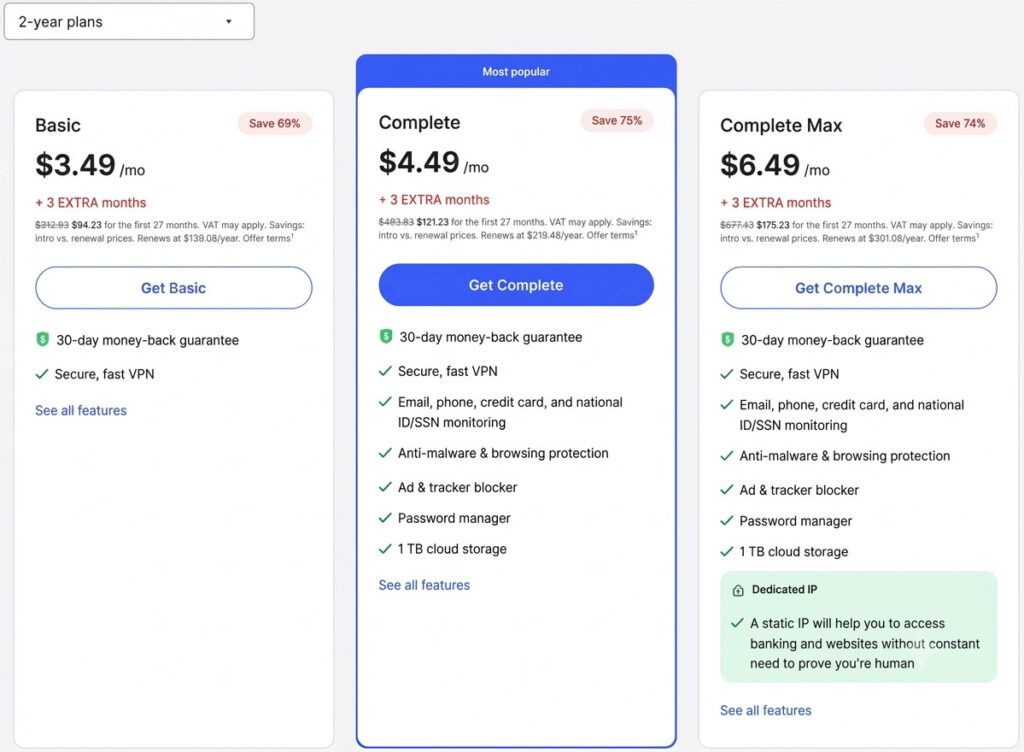
The Basic 2-year plan covers the core VPN. It is the right choice for most readers — the VPN itself is what you came for.
The Plus plan is the most useful upgrade. Threat Protection Pro is genuinely worth having, and NordPass is a solid password manager. The price difference from Basic is small enough to be worth it if you do not already use a dedicated password manager.
Complete and Prime add products you likely already have covered elsewhere — cloud storage and identity monitoring. Evaluate those tiers only if you need to consolidate tools.
Auto-renewal warning. First-year and two-year promotional prices are significantly lower than the standard renewal rate. Before your subscription renews, log into your Nord Account, go to Billing, then Subscriptions, and turn off auto-renewal. Then shop for a new promotional offer — new subscriber deals are available through NordVPN’s affiliate partners throughout the year.
The 30-day money-back guarantee is genuine. NordVPN’s refund process has been independently tested and takes around 5 business days to process.
NordVPN vs the Competition
NordVPN vs Surfshark:
It’s close, but Nord VPN wins out on speed, server network, and audit history. Surfshark’s cheap subscription and unlimited devices really impress,s though. If you need to protect more than 10 devices or you’re on a tighter budget, it’s the smarter option.
For the average individual user, er however, Nord VPN’s speed and previous audit reputation make the little extra price tag worth it.
Full side-by-side comparison in Surfshark’s review.
NordVPN vs ExpressVPN:
NordVPN comes out on top for price and feature set. It’s just as speedy as Express VPN, slightly more user-friendly, and it has its own history of audits. However, ExpressVPN costs almost double NordVPN’s two-year plan.
The difference in speed and privacy between the two is negligible.
It’s the difference in cost that really counts.
NordVPN vs ProtonVPN:
If privacy is your top priority, and you want to shield yourself to the max, then Proton VPN is the one for you. It is open-source, based in Switzerland, and all its applications are released to the public to allow independent scrutiny. Nord VPN is quicker nd a bit simpler to navigate. Unless privacy is of the utmost importance, Nord VPN is the better, daily-friendly alternative.
What NordVPN Does Not Do Well
10 device limit:
You’ll quickly feel this on the two-year plan if you have more than 5 devices connecting to your network at once. Surfshark and a handful of providers enable unlimited simultaneous connections per account. Using your NordVPN router install will get all your devices covered without being limited to the device cap.
No port forwarding.
This is going to be frustrating if you stream by means of torrent clients and want to seed content.
As port forwarding is not allowed in any NordVPN plan, it is a real limitation here,e and if it is a requirement, you… have to look to another provider such as Private Internet Access.
Obfuscation is not reliably effective in China.
Many providers offer obfuscated Servers that get past firewalls and proxies in quite lots of areas, but in China, with its extremely refined screening measures, this aspect simply does not work properly. Do not make an investment decision in NordVPN with this goal and have it tested by people in China before you ever purchase.
Renewal Price:
It is worth noting that the 2- year promotion comes with a large discount and renews at a higher cost.
This trend, however, applies to pretty much any VPN.
Simply create a reminder or take time out of your agenda and shop for another VPN service provider before your account matures.
Occasional delays on distant servers.
Connecting to servers in regions far from your physical location sometimes takes longer than expected. Not every server connects instantly. In practice this is a minor inconvenience rather than a dealbreaker, but it is worth noting.
Frequently Asked Questions?
Is NordVPN actually safe and trustworthy in 2026?
Yes. Five third-party, no-log audits (from Deloitte and PricewaterhouseCoopers) prove that NordVPN records and stores no user-browsing data or connection logs. RAM-only servers further ensure that data cannot be retained if a server is compromised.
During the 2018 data center hack, no user data was compromised, as no logs existed on the server in question.
While NordVPN is not perfect-the delay in disclosing the breach is a valid complaint-its technical privacy infrastructure is one of the most audited of any VPN on the market.
Does NordVPN slow down your internet?
Not significantly. NordVPN’s independent lab tests registered 730 Mbps at a retention rate of 73% on a 1 Gbps fiber-optic connection. On a typical 100 Mbps home connection, speed loss will go unnoticed for web browsing, streaming movies, or making video calls.
The NordLynx protocol minimizes speed loss over earlier ones to a greater degree than most VPNs.
Speed will be noticeable more heavily on very slow (under 20 Mbps) connections.
Which NordVPN plan is best value?
For most users, the 2-year plan with 5 connections at $3.49 per month covers all the necessities. For Threat Protection Pro and the NordPass password manager (unless you already subscribe to these), the Plus plan will only cost around $3.99 per month and is likely worth it. Whatever you do, avoid the monthly plan unless you are just testing the waters before committing-it costs over four times the 2-year option.
Does NordVPN work with Netflix?
Yes, for the most part. NordVPN’s SmartPlay feature routes streaming traffic through optimized servers. During testing, this feature was able to bypass geographical restrictions in Netflix US, UK, and Japan, along with BBC iPlayer, Disney+, and Hulu.
As services constantly update their VPN detection technologies, streaming access may fluctuate.
NordVPN continually maintains special streaming servers, but access is not guaranteed by the service.
What happened with the NordVPN data breach?
In late 2018, a third party, in whose data center in Finland one NordVPN server was hosted, had its system hacked. The unauthorized party was able to break into the server and extract a stale TLS certificate. No user data was ever compromised, because NordVPN maintained no logs of user activity or connection information on that server.
NordVPN went public with its information concerning the breach in October 2019, eventually switching all servers to the RAM-only, or volatile-memory protocol, commissioning several more third-party security audits, and ceasing all business with that specific data center.
The delayed disclosure of the event is a legitimate complaint, but this event did not compromise any NordVPN user’s personal data.
Is NordVPN worth it compared to free VPNs?
Yes. Free VPNs rely on users’ browsing data and other information as a means of revenue, whether by injecting advertisements, limiting speeds and server connections, or selling bandwidth. NordVPN, for $3.49 per month (on a 2-year contract), comes to just over the price of a single cup of coffee per month and provides a thoroughly verified, no-logs security protocol.
This is obviously no comparison.
The only free VPN worth it that offers verified no logs is Pro Ton VPN, but its plan does cap speeds and servers for its users. For all daily uses of a VPN, opt for a paid one.
Final judgment
So all in all, NordVPN is the strongest all-rounder VPN in 2026, and our top recommendation for the vast majority of use cases. It’s both the fastest VPN according to independent tests and boasts the most rigorously audited privacy framework out there; and crucially, it ticks off the actual VPN usage cases most people actually want (streaming, torrenting, remote work and public Wi-Fi).
The drawbacks are quite serious but niche. For unlimited device connections, choose Surfshark, and for port forwarding capabilities, investigate Private Internet Access. For robust access to China, research options more before parting with cash.
Otherwise, the 2-year Basic plan for just $3.49 a month ( with a 30-day money-back guarantee if it doesn’t work out for you) should be your first port of call.